OpenAPI
云打印开放平台 API 接口文档
Start Using - Getting Started Guide
UV cloud printing open platform is developed by Refinecolor ® The SAAS software system independently designed and developed by the team is professional and reliable
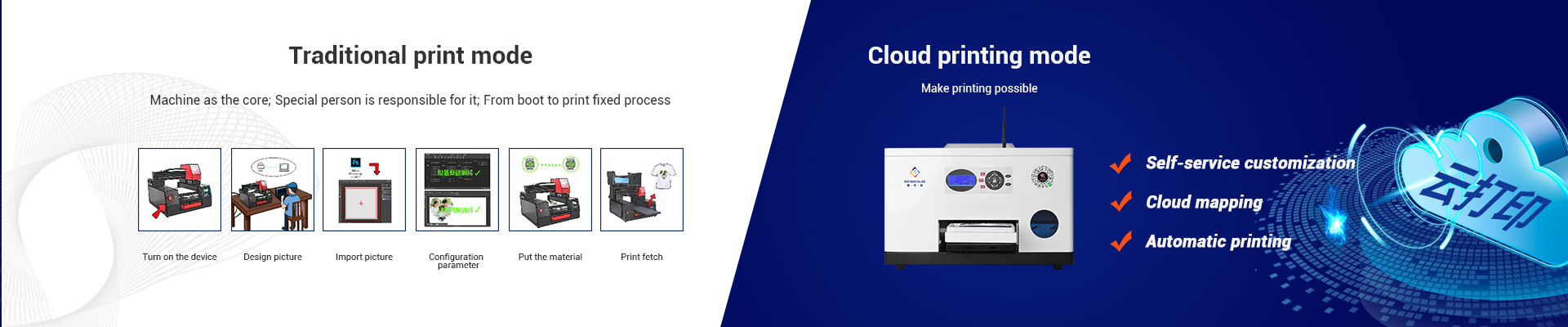
UV cloud printing open platform is based on Internet cloud services, cloud storage and Refinecolor ® UV printer hardware, utilizing internet technologies such as instant messaging, data exchange, and open interconnection, provides printing services that combine internet and UV printer resources, allowing developers' third-party platforms to communicate in real-time with UV printers through network requests, achieving remote calling and printing functions
UV cloud printing open platform consists of open platform, Refinecolor ® Composed of network printing interface, printing terminal software, and printing driver software, the interface is formed through integration and opened to the public, allowing developers to easily connect with Refinecolor Cloud ® Printing, quickly realizing various customized printing needs and services
If the device encounters an unsolvable problem during debugging, you can contact the person in charge of cloud printing to troubleshoot the problem and find a solution. Contact information is as follows:
Phone: 137-5177-4454 [WeChat account]
Email: info@ColorPark.cn
Open platform guide
Scenario of API
Call the printing interface provided by the platform, and the printer cooperates with cloud services and client applications to achieve task scheduling and queue printing.
At the same time, it can provide real-time access to task status, device status, and remote cleaning and maintenance of equipment.
Applicable scenario: Various web applications, mini programs, and apps with networking needs.
Basic concepts and technical terms
1、Printer ID
Each printer is assigned a unique printer ID, which can be viewed and copied in the "Device List".2、Printer Key
The printer key is used to ensure data security in enterprise applications, and each application has an independent access key. To ensure data security, the printer key must not be leaked.3、Generate Signature
Generating a signature is the process of generating an encrypted string by encrypting the printer ID, pritner key, random number, and create time, which is used to verify the authenticity of the other party's source data during transmission. Please refer to the section on 《Generating Signatures》 for the method of generating signatures.4、Callback API
The callback interface is a way for Ruifeng Color open platform to notify third-party platforms, such as the status of printers and the progress of printing tasks. Please refer to the sections of Printer Status Callback and Print Task Callback for details.5、Printing Terminal Software
The printing terminal software is used to receive printing messages, receive printing pictures, process printing pictures and send them to the printer. It connects the intermediate software between the open platform and the printer. The computer connected to each printer must install a printing terminal software and bind the corresponding printer ID.

结语
只需专注 业务场景
Choose ColorPark UV cloud printing - no R&D investment, no server investment, no cumbersome operations
底层方法【基础支撑】
结语
物不在多,有用则精。
ColorPark - We have an excellent and innovative software and hardware research and development design team.
云打印开放平台 API 调用协议
如无特殊说明,接口的所有参数值均为 UTF-8 编码
打印机选型
Printers with network capabilities can be upgraded to connect with cloud printing capabilities, and printing products are not limited.
| 型号 | 图片 | 参数 |
|---|---|---|
| PC |  |
适用:UV 喷头:单喷头 高度:固定 配色:CMYK / CMYK+W 尺寸:60*47*42.5 cm 重量:33kg |
| TS1/2 |  |
适用:UV/ 纺织 / 光油 喷头:单喷头 / 双喷头 高度:5CM 配色:CMYK / CMYKW / CMYKW 光油 尺寸:80.5*76.5*51 cm 重量:60kg |
| ZZ1E/2E |  |
适用:UV / 纺织 / 食品 / 光油 喷头:单喷头 / 双喷头 高度:20CM 配色:CMYK /CMYKW / CMYKW 光油 尺寸:80*76.5*63.5cm 重量:72kg |
Create Print Task
Create a print task, which is mainly used for the third-party platform to send a print picture task to the open platform through the interface method. After receiving the print task, the open platform will automatically send it to the print terminal software of the corresponding device number. Printing tasks can be distributed offline, and once the printing terminal is online, it can receive all offline distribution tasks
| API Address | http://www.colorpark.cn/api/Printer/mulPrint |
| Request Method | POST |
| Parameter Name | Parameter value(Example) | Must | Parameter Description |
|---|---|---|---|
| printer_id | 500001 | Yes | The unique ID assigned to the printer, with each printer assigned a different ID |
| once | 8305 | Yes | Random number used when encrypting signature generation |
| time | 1646790335 | Yes | The timestamp used when encrypting signature generation |
| sign | 9ce3ce7a3fccaf3d7715bd7e9bb1dc1c | Yes | The generated signature, please refer to the section on generating signatures in the Bottom Level Method【Foundation Support】 |
| order_id | 164679033555822 | Yes | The order ID of a third-party platform, supports a maximum of 32 characters |
| name | Product A | Yes | The product name of third-party platform, supports up to 32 characters |
| file | https://img.colorpark.cn/api/render/36531651306594235.png | Yes | The website address of the image that generated by a third-party platform, with a maximum support of 255 characters. |
| width | 185 | No | The width of image, in millimeters |
| height | 140 | No | The height of image, in millimeters |
| left | 0 | No | The left margin of the starting point, in millimeters |
| top | 0 | No | The top margin of the starting point, in millimeters |
| callback | http://www.abc.com/api/callback | Yes | The callback address used by third-party systems to receive printing notifications, such as start printing notifications, complete printing notifications, cancel printing notifications, and print fault notifications |
| Parameter Name | Parameter value(Example) | Parameter Description | |
|---|---|---|---|
| code | 0 | Return the result status code, 0 on success and 1 on failure | |
| msg | Submitted Successfully | Return result description, such as: Successfully Submitted | |
| data | taskid | 20000196 | Unique ID for printing tasks |
| order_id | 164679033555822 | The order ID of a third-party platform, supports a maximum of 32 characters | |
| status | 0 | Print Status,0:Waiting 1:Printing 2:Completed 3:Cancell 4:Failure | |
Query Printing Task
The query printing service is mainly used to query the main information of the printed tasks that have been dispatched, and can be called in the places where the printing task information needs to be displayed on third-party platforms.
| API Address | http://www.colorpark.cn/api/Printer/getTask |
| Request Method | POST |
| Parameter Name | Parameter value(Example) | Must | Parameter Description |
|---|---|---|---|
| printer_id | 500001 | Yes | The unique ID assigned to the printer, with each printer assigned a different ID |
| once | 8305 | Yes | Random number used when encrypting signature generation |
| time | 1646790335 | Yes | The timestamp used when encrypting signature generation |
| sign | 9ce3ce7a3fccaf3d7715bd7e9bb1dc1c | Yes | The generated signature, please refer to the section on generating signatures in the Bottom Level Method【Foundation Support】 |
| taskid | 20000196 | Yes | Unique ID for printing tasks |
| Parameter Name | Parameter value(Example) | Parameter Description | |
|---|---|---|---|
| code | 0 | Return the result status code, 0 on success and 1 on failure | |
| msg | Submitted Successfully | Return result description, such as: Successfully Submitted | |
| data | taskid | 20000196 | Unique ID for printing tasks |
| printer_id | 500001 | Printer Unique ID | |
| order_id | 164679033555822 | The order ID of a third-party platform, supports a maximum of 32 characters | |
| template_id | 1 | Print Template ID | |
| name | Product A | Trade Name | |
| file | https://img.colorpark.cn/api/render/80301001651287933588.png | URL address for printing images | |
| status | 0 | Print Status,0:Waiting 1:Printing 2:Completed 3:Cancell 4:Failure | |
| callback | 0 | The callback address used by third-party systems to receive printing notifications, such as start printing notifications, complete printing notifications, cancel printing notifications, and print fault notifications | |
| create_time | 0 | Print task creation time | |
| start_time | 0 | Start printing time | |
| finish_time | 0 | Complete printing time | |
Cancel Printing Task
If you do not need to print the print task after distributing the print task, for example, if the order has been refunded, you can find the call to cancel the print task on the third-party platform to the open platform. If the print task is in the process of printing or has been printed, the print task cannot be cancelled successfully.
| API Address | http://www.colorpark.cn/api/Printer/cancelPrint |
| Request Method | POST |
| Parameter Name | Parameter value(Example) | Must | Parameter Description |
|---|---|---|---|
| printer_id | 500001 | Yes | The unique ID assigned to the printer, with each printer assigned a different ID |
| once | 8305 | Yes | Random number used when encrypting signature generation |
| time | 1646790335 | Yes | The timestamp used when encrypting signature generation |
| sign | 9ce3ce7a3fccaf3d7715bd7e9bb1dc1c | Yes | The generated signature, please refer to the section on generating signatures in the Bottom Level Method【Foundation Support】 |
| taskid | 20000196 | Yes | Unique ID for printing tasks |
| Parameter Name | Parameter value(Example) | Parameter Description | |
|---|---|---|---|
| code | 0 | Return the result status code, 0 on success and 1 on failure | |
| msg | Submitted Successfully | Return result description, such as: Successfully Submitted | |
| data | taskid | 20000196 | Unique ID for printing tasks |
| printer_id | 500001 | Printer Unique ID | |
| order_id | 164679033555822 | The order ID of a third-party platform, supports a maximum of 32 characters | |
| status | 3 | Print Status,3:Cancell | |
Print Task Callback
This interface is developed by a third-party platform. The open platform transmits real-time messages of print tasks to this interface. The third-party platform needs to process different messages, such as printing, printing completion, printing cancellation, and printing failure. Third party platforms can process messages according to their different states.
| API Address | http://xxxx.com/api/callback |
| Request Method | POST |
| Parameter Name | Parameter value(Example) | Parameter Description |
|---|---|---|
| taskid | 20000196 | Unique ID for printing tasks |
| printer_id | 500001 | The unique ID assigned to the printer, with each printer assigned a different ID |
| order_id | 20000196 | Order ID in third-party application |
| status | 2 | Print Status 1:Printing 2:Completed 3:Cancell 4:Failure |
| msg | Completed | 根据任务status显示不同信息。 1:Printing 2:Completed 3:Cancell 4:Failure |
| Callback description | After receiving the return message, the third party needs to output confirmation information to complete the processing. If the processing result information is not output or the processing result is failed, the callback will repeatedly submit 5 to the callback interface within 2 hours, and the processing will be abandoned after 2 hours |
| Successful callback processing returns a string | success |
| Callback processing failed and returned string | fail |
打印机状态回调
This interface is developed by a third-party platform, and the open platform transmits the printer status to this interface, such as offline, online idle, printing, and failure of the printing software. Third party platforms can process messages according to their different states.
| API Address | http://xxxx.com/api/printerStatus |
| Request Method | POST |
| description | This API is developed by a third party platform, and the open platform sends print real-time messages to this API. The third party platform needs to process different messages |
| Parameter Name | Parameter value(Example) | Parameter Description |
|---|---|---|
| printer_id | 500001 | 打印机分配的唯一ID号,每一台打印都会分配一个不同的编号打印机状态回调功能 |
| status | 2 | Printer Status,0:Offline 1:Idle 2:Printing 3:Fault |
| msg | Completed | Display different information based on printer status 0:Offline 1:Idle 2:Printing 3:Fault |
| notice_time | 2022-07-19 17:08:30 | Notification Time |
| Callback description | After receiving the message, the third party needs to output confirmation information after processing is completed. If the processing result information is not output or the processing result is failed |
| Successful callback processing returns a string | success |
| Callback processing failed and returned string | fail |